Subscribe

Search

Categories

Archives

Stuff

Photos

    www.flickr.com
    This is a Flickr badge showing public photos from legaltech. Make your own badge here.

Quotes

Some of them try ta rhyme but they can't yo.

-Kriss Kross

View Sean Tierney's profile on LinkedIn


10 lessons I’ve learned from doing our Adwords

April 15th, 2008 by sean

I read a book on Adwords, watched most of the Google videos and have been tweaking our campaigns for JumpBox for the past 2wks. You can burn a lot of cash during the learning process. Here are ten things I’ve learned that will hopefully save others some time/money:

Custom-designed landing pages were actually detrimental (”jarring” effect)

This was completely counter-intuitive. Our original hypothesis was that it would be worth it to make a professionally-designed landing page stripping away most navigation choices because it would be more aesthetically appealing to a first-time visitor and better “corral” that person to the desired action. What we learned was that it had an adverse effect - conversion rates actually declined when we implemented these specially-designed pages. We achieved a better conversion rate by reverting to a standard page with all the regular look & feel and the same content. Our guess of what’s going on here is that having a landing page that looks nothing like what you get on the next click is either perceived as an ad or is just too visually jarring for the user. Visual consistency trumps design aesthetic and removing normal navigational elements yields no positive effect.

Fear of loss is a stronger motivator than promise of gain (”Fox news” effect)

This is something that my friend Dave Euse told me a long time ago and I’ve seen it confirmed first-hand with our adwords campaigns. While I’m not a fan of “Fox News” style scare tactics- it is more effective to say something like:
“What you don’t know about JumpBox could be costing you days of setup time.”
than something like this:
“You can save days of setup time with JumpBox.”
Think evening news segment teaser just before a commercial comes on. It’s a subtly different message but the idea is that people respond more to stop the prospect of losing $5 of their own money than to an equal opportunity of winning a new $5.

Web Optimizer is good for polishing but not sculpting (”bigger fish” effect)

Kimbro pointed this out and he’s 100% right- the Google Web Optimizer multivariate testing tool is helpful for fine-tuning messaging but it’s premature to use it until you have the fundamentals of the campaign ironed out. Until then there are bigger fish to fry in terms of getting the value proposition clear. We have an educational component to our stuff- the user doesn’t necessarily know how to describe their problem in terms that we can predict. The best thing to do in this situation is to forget about GWO until the point you have a good number of people already responding and then bring it in as an optimization.

Scientific method: control one variable at a time (”Apples to apples” effect)

This one is probably obvious but if you are trying to test a theory, don’t vary multiple elements at the same time. Control all the variables except the one you want to test. With Adwords there are many aspects of the campaign you can tweak and you may be tempted to vary multiple elements simultaneously to speed the testing process. Unfortunately the result will be that you’re unable to attribute the improvement or decline to a single variable when you do so. An example of this might be varying a headline while also changing the display URL - the effect from one may eclipse the other and hide minor effects. The other thing to keep in mind is you need to have a big enough sample size for your tests to be meaningful. There are plenty of free statistical significance calculators that will tell you if your results are truly significant.

The three phases of interaction: acquisition, conversion & retention

It’s helpful to think about the sequence of interaction in terms of these three phases:
Acquisition: the process of getting traffic to your site
Conversion: the process of converting those visitors to customers
Retention: the process of selling more stuff over time to your existing customers
Simple yes, but these are three independent activities with different challenges and different psychology. Thinking about them as three distinct activities will clarify what you need to be doing at each step.

Split test everything you do

Never stop split testing, ever. You should be running different flavors of your messaging in each of the above three phases. Google adwords has a built-in mechanism for running multiple variants of the same ad. Google web optimizer allows you to run multivariate and A/B tests on your site’s pages for the conversion process. And ideally you should be running A/B tests in the retention emails you send. I know Vertical Response is one service that supports A/B testing and I’m sure others do as well.

Analytics can help you visualize your funnel

You can see the click-path from both directions- from an entry page where the visitors went or from a final destination page and the various entry points that got them there. Make sure you have a google analytics account setup and integrated with your adwords and then go to the Content menu selection, click on the page you want to analyze and use the “Navigation Summary” and “Entry points” options. You should also ideally have conversion tracking set up on the thank you page of the intended action so you can tie specific campaigns and keywords to conversion.

Stumbleupon is a great way to get quick traffic for multi-variate testing

Stumbleupon is a firehose of semi-qualified trafic you can turn on at any time to expedite split testing. Keep in mind it’s blind traffic so it’s not a pure substitute to people that come actively searching for something, but it’s a quick way to accelerate the testing process. Have the Google Web Optimizer set up on the landing page and turn on stumble upon ads from an area of interest that most closely matches your target audience. You’ll get a flood of traffic very quickly and depending on how you set your tests up in GWO you’ll either see which version of the page or which combination of individual elements worked best. A/B testing produces a statistically significant result faster since they’re are fewer permutations. The other benefit of Stumbleupon traffic is the secondary wave of clicks that come from the social bookmarking component- you don’t pay for these so your paid campaign can actually seed an organic response if the page is well-received.

Dynamic text insertion

Contrary to what I thought, this is not just a technique relegated to the ebays of the world. These are the ads you see when you search for “steak knives” and see an ad that says “Buy steak knives on ebay.” Anyone can dynamically insert the search term into the text of the ad using this syntax:
{Keyword:search term substitute here}
The substitute word is used in the event that the search term is too long to appear in the ad. This tactic should be done in its own ad group and you should be aware that it generates a high volume of less-qualified traffic (make sure you have a tight daily cap on adspend and monitor closely when you try it). It also works very differently on content network vs. the Google search so you’ll need to experiment with it.

Crazy Egg can help provide clues to usage

Definitely try the free Crazy Egg service out on your landing page. It gives you a heatmap of user clicks and can provide interesting clues about how people are responding to your stuff. We learned the ineffectiveness of presenting a call-to-action too early in the dialogue before the user understood what we offer.

Other Resources
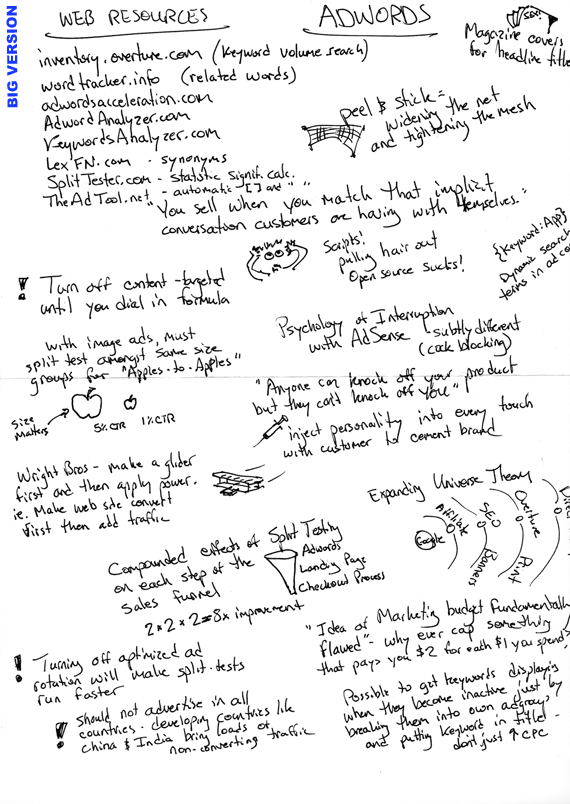

Here are some resources I used to get started: this Adwords book was a good primer- it’s by this guy Perry Marshall who really knows what he’s talking about. It had not just valuable info but it was motivating - all this stuff is useless if you don’t act on it. I posted my visual notes that give a good overview of the important takeaways from that book (I used this same style on the “Made to Stick” book and found it very helpful for retaining concepts). Google’s screencasts are a good starting reference but they’re a little slow - you might be able to figure it out faster via trial & error. Search for a local Adwords meetup in your city- I’m all for “high-bandwidth” face to face interaction in user groups for picking up tricks of the trade and getting answers once you have some experience and a list of questions.

I’m still extremely green to the whole Adwords game and making tons of mistakes as I go but hopefully this summary helps others who are just getting started. Improving conversion rate is crucial and our next big challenge now is to optimize our landing pages to better convert some of this traffic we’re now getting via Adwords. Minor improvements in conversion makes every bit of advertising you do more potent. In theory this process should reach a point where it’s a finely-tuned machine that accepts a dollar at one and and returns five at the other. I’ll report back with more lessons once we get it to that point.


Posted in Nerd, Google | 2 Comments »

JumpBox for Google App Engine now available

April 11th, 2008 by sean

The Google App Engine is the talk of the town this week giving developers access to Google infrastructure and Google customers. If you haven’t heard about it you may be an ostrich and need to read some of these. If you didn’t get one of the 10k beta invites, no worries- you can still play with it. We just made it significantly easier to tinker by releasing a JumpBox for the Google App Engine SDK. This is a freebie and it comes pre-registered so you download it and fire it up and you’re playing with App Engine in minutes. You can leave comments/feedback on it here. And this is our “official” announcement:

Google recently announced a new cloud based application deployment system called Google App Engine. We found this to be a pretty interesting system and since the SDK they released is Open Source we decided to put together a JumpBox for it.
It’s a great solution if you want to play with the Google App Engine SDK without really installing it on your system. It’s also perfect as an integration point for a small team working together on a Google App Engine project.

Google made it possible to build applications for App Engine using several different mechanisms and the JumpBox comes with CGI, Google Webapp and Django environments setup and ready for development. It’s also a really great way to just kick the tires of the different frameworks before committing to development.

Also, since this is a JumpBox our backup system is included which allows you to backup your source code and development data to network shares or Amazon S3.


Our experience with the Google Pay-per-action Beta

December 1st, 2007 by sean

What is PPA?

Pay-per-action advertising is a model where the advertiser gets paid only when the visitor completes a specified action on the advertised site. This model has incredible potential for both parties because it circumvents the problem of click fraud (it can be setup so advertisers are paid only when sales are made). From the advertiser’s perspective, you’ll happily pay commission on sales that are made and it’s like having an outsourced affiliate program that you don’t have to manage yourself. From the publisher’s perspective, you can “rep” products that are relevant to your site’s content and (in theory) earn more than you could via adsense because the payouts are much higher. Google’s move into this space disrupts incumbents Commission Junction and ShareASale which currently charge significant setup fees to get involved as an advertiser (Google charges no setup fees).

Our experience with the Google beta

The unfortunate reality of the current state of the PPA beta on Google is that it appears to be riddled with fraud. “But I thought you said you couldn’t get burned?” - let me explain. We signed up a few months ago and posted a handful of JumpBoxes in their directory offering a generous commission (over 30% for sales generated) to attract affiliates. We saw downloads skyrocket immediately but zero new conversions came from those new downloads. This probably should have been a red flag that the downloads were bogus, but we were still hopeful that it was just a matter of us adapting a landing page for better conversion and continued to run the PPA ads.

About two weeks into it we had seen not one sale originate from the PPA ads- we weren’t losing money on them since the payout was still tied to a sale, but the spurious downloads were throwing off our conversion numbers and tainting our stats. The participants in the Adsense Referrals network (which is this program from the publisher’s side) have a rating system for advertisers and we were concerned that we’d be blacklisted because we hadn’t yet done any payouts so we changed the rewarded action from a sale to the completion of a lead form upon successful download. We dropped the commission significantly to $.50 and treated it as a pure lead generation program. Fortunately we had set the daily cap in adspend because immediately people took advantage of this change and filled out junk emails repeatedly to earn the $.50 payout. I was surprised with how quickly this abuse came. We promptly shut off the PPA ads and discontinued participation in the program - we only lost something like $30 altogether.

Advice for Google

This has got to be a tough problem to combat from Google’s perspective. Juggling both sides of the equation, they have to attract enough quality advertisers with desirable and discreet products that work in the affiliate scenario while at the same time keeping a high quality of publisher in the referral network so as not to alienate the advertisers. Opportunity for fraud abounds - from the advertiser side, there’s no surefire way to enforce that the payout actions are accurately tracked (ie. i could start with the tracking script on our checkout thank you page and then remove it or selectively serve it every fifth purchase to dilute the commissions we pay and nobody would be the wiser). On the side of publisher fraud, it’s easy to participate only in the referral programs where payout doesn’t require a sale and then surf through an anonymizer to emulate people completing those actions via your ads. Google’s system of ratings from publishers is clearly how they are screening advertisers but they don’t seem to have a good way to eliminate the shady publishers. I didn’t see the equivalent ratings system for advertisers to use for this purpose.

Presumably the advice for now is to simply never pay commission on anything other than a sale- unfortunately that reduces the reach of this program to ecommerce sites only. My advice to Google though would be to disallow payment on actions other than sales to “cleanup the streets” in the near term and make it impossible for scammers to game the system. Once it’s economically unviable for them to make money there, they’ll leave and find another shady neighborhood to haunt. This whole thing oddly makes me wish there was an “Internet-wide Boys and Girls Club” to give fraudsters something positive to do- all that clicking just to earn $.50… you’d think there would be a HIT on the Amazon Mechanical Turk where they could legitimately earn more than that will less work…

I hope they figure something out because I love the approach in general of yoking reward as directly as possible to performance. Having studied the negative extremes of this principle with the Learned Helplessness paradigm in school, the idea of tethering reward to successful efforts has appealed to me on a very fundamental level and beyond business. I don’t have a silver-bullet suggestion for Google on how to stamp out fraudulent activity. It’s a very knotted messy problem that could easily spiral out of control scaring away advertisers and creating negative press. Fortunately they have some of the brightest minds on it - having just had lunch on their campus earlier this week, I can attest that it felt like there were definitely more brain cells per capita at Google than any place I’ve been on Earth.


Using cross-channel conversion tracking to understand your advertising

November 27th, 2007 by sean

If you’re like us you have a slew of different ad campaigns running at any given time- newsletters, pay-per-click, stumbleupon, download directories, sponsored banner ads, auto-responders, etc. Tracking conversions means being able to identify the visitors to your site who ultimately complete the desired action and know which avenue brought them to you (and it’s useless to experiment across ad channels if you don’t track which ones are working). You can roll your own home-grown mechanism to track conversions but if you have a Google Adwords account, you already have access to their cross-channel conversion tracking system which will do this for you. Here’s how you can take advantage of it:

  1. Signup for an adwords account if you don’t have one already.
  2. You’ll need to add the conversion tracking code snippet to the thank you page on your site that the visitor sees when he/she completes the intended action on your site. Follow the instructions here to set it up.
  3. Next you’ll create a new cross channel tracking campaign for one of your ad channels- let’s do it for your newsletter first. What may be confusing is that even though we’re in your adwords account, adwords could be one channel you can use this to track all your ad initiatives). Follow their 3-step wizard for specifying the details of this newsletter-specific campaign and get the landing page code and the tracking URL.
  4. Put the landing page code snippet in your header or footer so it’s on every page of your site (you only need to do this once and it works across all channels that you track).
  5. Lastly, look at the newsletter-specific tracking URL and grab just the part that says:
    ?gad=xxxxxxxxxxxx” and append that to any links coming from your newsletter. Rinse and repeat for each ad campaign you have running so that they all get a unique tracking URL.

You’re now collecting data on how each campaign is doing and you’ll know exactly which ones are performing well and which ones suck. You can see from our data below that we have a spread of 0% - 38% effectiveness depending on the particular channel - that’s critical info to know if you’re spending thousands on ads! Minor improvements in conversion can translate to huge savings in adspend as I explained here. Happy conversion tracking!

CrossChannelTracking.gif


OpenSocial hurts Facebook no more than Orbitz hurts SWA

November 4th, 2007 by sean

Wow, the volume of commentary around the OpenSocial announcement last week is enormous. Let me explain why all the doomsday predictions for Facebook are off the mark. Here is an analogy:

Saying OpenSocial will kill Facebook is like predicting that Orbitz will kill SouthWest Airlines.

SWA still has superior value and user experience to any airline in the Orbitz consortium when it comes to reliable, affordable travel. And at the end of the day as a consumer of air travel you’re just buying a ticket and getting on a plane. Twenty-two competitors that have second-rate products don’t unite to form Voltron and having a bargain shopping aggregator doesn’t kill off the vendor who refuses to participate if he still has the best bargain for the customer. Likewise, having “one API to rule them all” is nice for developers writing applications for social networks but it takes more than that to make users of the abstaining network flee the place where all their friends are.

Josh Catone of ReadWriteWeb wrote an excellent analysis. Opening the platform and appealing to the developers to build applications is a tactic Facebook used to amplify their power and deliver the ultimate user experience while offloading the burden of developing compelling apps to external developers. Think of it as the development equivalent to a company’s reseller program only instead of leveraging external sales forces, they’re leveraging external development forces.

I share the same concern that Marshall Kirkpatrick expressed - for all the hype of OpenSocial, it doesn’t sound like it will truly be a 2-way street of open-ness as the name implies. It will be interesting to see how FB rolls with the punches but they shouldn’t have any more fear of OpenSocial than SWA has of Orbitz. They’ll participate when it makes sense. Maybe someone will write an abstraction layer that sits above FBML and OpenSocial XML? Maybe not and instead developers will have to write to both systems (like software vendors that write native Mac and PC installers)… Ultimately users go to the “clean well-lit place” that provides the best experience. As the industry moves inexorably towards open the underlying social network fabric becomes irrelevant (think IM channels - Gtalk, Yahoo, MSN, AIM, ICQ- irrelevant since Adium or Gaim is the interface that masks the underlying complexity). That Adium-equivalent for social networks will be the interesting piece at that point; a single dashboard that gives me one place to manage my digital identity easily in the way that Adium lets me forget what IM services I’m using and talk transparently to my friends regardless of the service they’re on.


How we doubled our conversions using the Google Web Optimizer

February 22nd, 2007 by sean

If there’s one concept you learn this month that has the single greatest potential to improve the profitability of your site, the power of DIY multivariate analysis using the Web Optimizer is it. Let me explain.

What is Multivariate analysis and why should you care?

Multivariate analysis in the context of web sites is the science of changing elements on a page and studying the effect they have on your visitors’ behavior. If you have a web site, presumably you already have a goal and your site facilitates a behavior from visitors that contributes towards achieving that goal. There is likely a desired outcome you’re seeking on each visit - an action you want that person on the other side of the wire to take such as filling out a contact form or purchasing a product. This desired outcome is known as a conversion.

Improving your conversion ratio even one percent can lead to massive improvements in sales and profitability. This calculator is a simple way to run some what-if scenarios given your current order size, traffic and sales numbers. The easiest way to understand the benefit of improved conversion is to think about it as “miles per gallon” on a vehicle- think how much gas you would save if you doubled the fuel efficiency of your engine? But it’s even better with web traffic. If your current cost per acquisition for a customer is $5 per customer given all your fixed design/development/hosting costs and marginal costs like advertising, converting twice as many visitors with zero additional cost can bring your cpa down to around a dollar. This has a dramatic effect on profitability of your operation - the effect on profitability is non-linear especially if you feed the savings back into targeted promotion.

How GWO works

So now that you understand the value of improving conversion, let’s talk about how GWO specifically does it. Google Web Optimizer is javascript-based multivariate analysis tool that gives you the ability to test different versions of key pages on your site to determine the winning formula that produces the highest conversion. You set up experiments and GWO will dynamically serve different flavors of the same page randomly to different visitors and record the number of resulting conversions. The empirical data is then presented in a graph like the one below. Provided you have enough traffic to produce significant results, the tool reveals the winning combination along with the confidence level of the suggestion (ie. the statistical significance).

GWOExperimentResultsSM.gif

You can see that Graphic #4 outperformed the others and crushed the original graphic by almost double.

And the winner is…

So this is all nice in theory but let’s take a look at a concrete example of how this helped us refine our messaging on the JumpBox site. A week ago I set up GWO on the JumpBox homepage and tested five different versions of the main graphic. Here’s the five versions I tested:

GWO_layoutE.gif GWO_layoutD.gif GWO_layoutC.gif GWO_layoutB.gif GWO_layoutA.gif

Can you guess which one performed the best?

(scroll down for the answer)

spacer.gif

(keep going…)

spacer.gif(wait for it…)

spacer.gif(waiiiit for it….)

spacer.gif
winningGraphic.jpg

This version converted at a rate of 21.2% - double that of the original which performed at 11.3%. The breakdown for all is as follows:

GWO_layoutE.gif GWO_layoutD.gif GWO_layoutC.gif GWO_layoutB.gif GWO_layoutA.gif
Combo 2
16.1%
Combo 3
11.6%
Combo 1
18.7%
Combo 4
21.2%
Original
11.3%

Personally I thought gradients were unfashionable in ‘96 but that just proves that conversion is not necessarily about spectacular design. The designers who create spiffy pages and defend their effectiveness from a design standpoint may be completely missing the boat in terms of the effectiveness of the design in converting traffic. Nobody can argue with real numbers from your own visitors - at that point the winning choice is no longer speculation, there is a right answer as confirmed by empirical data.

Anyways, it should be noted that for the purposes of this experiment I counted a conversion as a click through to the about page to read more about the JumpBox technology. Down the road it will make more sense to count a download of our free trial as the conversion but I did it this way for now to get more data immediately on the effectiveness of the homepage graphic for moving people to that next page. I didn’t utilize the multivariate capabilities of GWO either- i used it more as an A/B split test (actually, A/B/C/D/E split). GWO can juggle permutations of headlines, graphics, text, calls to action, and any other displayable element on the page and intelligently report the winning assembly of items. Another aside, we used StumbleUpon advertising as a fire hose of semi-qualified traffic that we could turn on at will to accelerate testing. This worked very well.

What you do if you are interested in using GWO

The video tutorial from Google nails the setup process so I won’t rehash the steps for how to implement it. GWO is in private beta at the moment but it seems they’ve been letting in groups more frequently lately so sign up here and wait for your number to be called. You’ll know you’re in when you see this additional tab appear in your adwords account:

GWOnewTabinAdwords.gif

My only complaints about the tool so far are related to usability - it’s not quite there yet for non-technical users. You will need access to paste javascript code into your web pages as well as the technical ability to do so. I would love to see GWO use a single block of js that you install once and allows you to run experiments serially without having to strip out the old js and re-paste in the new. Google’s best move going forward with this will be to author plugins for the popular CMS platforms and ecommerce engines to simplify adoption and save people from ever having to futz with javascript at all. Other than those gripes, this is an amazing tool for people with web sites. No more speculative argument about “this design is way better than that one” - now there is a definitive answer to which designs and promotions work best.
Have fun with it.


Posted in Nerd, Google | 7 Comments »

« Previous Entries