This is an analysis of the various options available for finding new music. As with anything the tools and techniques I’ll put forth are neither inherently good nor bad. If you use these tactics to steal music- shame on you. If you use them to get turned on to a bunch of new albums (some portion of which you end up buying) and it translates to more music purchases than would have occurred otherwise- then good for you (and good for the musicians). I’m simply going to explain the stages involved and the tools available.
The way I see it, from the time you first hear a new song that grabs your interest to the time that you plunk down money for it, there are three discreet phases that occur in this sequence:
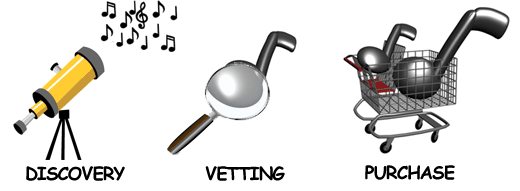
These steps can be folded into one sitting but the chain is always the same in that you
a) discover the new music
b) listen to it more and determine that you like it enough to
c) go about purchasing it.
If we acknowledge these are the three stages we can examine which tools work best for each:
Discovery
Think of the situations in which you are most likely to discover a new artist- listening to the radio, having a friend play a song that you like, catching an opening act at a concert that surprises you… Of the ones that you have some control over, here are some thoughts on how to maximize your exposure to music you will like:
Traditional Radio – this is all but worthless for music discovery unless you’re hoping to discover Nickelback’s newest single or the next YHBTIM nomination. I stopped listening to FM radio two years ago and felt immediately smarter for cutting out the commercials and radio show banter that cluttered my daily drive. I also found that removing my antenna gave my (plus it made for a great shishkabob roasting implement on our last camping trip).
Satellite Radio – I had Sirius Radio for awhile and it was better than FM for the absence of commercials but even the programming on that got stale eventually. I never did try XM radio but I know some people swear by one or the other. At $13/mo I eventually decided for the limited amount of time I spent in the car and the extended hours I spent at the computer, that money was better spent on a Rhapsody subscription being able to listen to any band on demand. I’ll discuss the iPod radio place-shifting concept for your vehicle below.
Internet Radio – this is a great way to discover new bands at work. Shoutcast servers broadcast audio streams that can be consumed by iTunes, Winamp and Windows Media Player for decent quality audio grouped by different genres. There’s few if any commercials and quality of playlists varies station to station but I’ve found to be much more variety and originality than traditional or satellite radio.
Indie Station Podcasts – Garageband.com maintains a huge listing of indie radio station podcasts that you can subscribe to via iTunes so it automatically grabs the latest MP3’s. This is somewhat a “needle in a haystack” smattering of mostly crap but with some real gems to be discovered. If you’re the type that likes to hit a bunch of yardsales and hunt through stacks of mostly junk because you can somtimes discover that obscure gem, this is probably for you. But if you want more “signal than noise” you’re probably better off finding a couple good Internet radio stations.
iPod Place-shifted Internet Radio – Now for some controversy. So you can listen to Internet radio while you’re at your computer but you can also rip the audio streams to your iPod and listen to Internet radio in the car. I know some people will say this is cheating and this is where it comes to how you use this tactic- if you use it like a Tivo to truly time/place-shift your Internet radio, then I believe it’s a valid use. If you’re using it to steal music which you listen to repeatedly but never buy, then boo-hiss on you. The quality is going to be degraded at an avg of 96kbps and you’ll most likely get streams that chop off the beginning and ends of songs but if you can put up with those nuissances, this is a great way to avoid crap radio stations in the car and discover new stuff. Stream ripper is an open source plugin to Winamp that let’s you rip a shoutcast audio stream and store it on your iPod. Pandora’s Jar is a windows app that will rip a pandora station to your hard-drive and allow you to store it on your iPod. I’ve not used Pandora’s Jar. Whether you consider these tools “Tivo for Internet radio” or instruments of a thief, you should be aware of their existence.
Online Discovery Services – There are a ton of services online that can be divided into two categories:
- Audio-based – Pandora and Last.FM are by far the two most popular though they use different methods for making recommendations. There is an excellent blog post that describes the essence of the difference in recommendation engines. Basically Pandora draws upon what is called the “Music Genome Project,” essentially a massive database of music classified by objective characteristics of the music itself (ie. tone, rhythm, timbre, etc). It’s a flash-based app that runs in your browser allows you to seed it with music you like and then give thumbs up/down as it makes recommendations to tune it to your personal preferences. Last.FM comes from the other angle making recommendations based on what’s called collaborative filtering, or purely by comparing listening preferences of people that share your likes. It doesn’t know anything about the qualities of the music itself. Last.FM is a client-based app that runs on Mac or Windows. Both produce totally different recommendations and can turn up some real gems based on your taste in music. And both have nifty widgets and online exposure tools if you run a blog to be able to broadcast your stations and listening history (see the audio section in the left side bar of this site). Mog and iLike are two relatively new entrants to the music recommendation game, neither of which I have tried.
- Visual-based – among the visual mapping tools for music discovery are Live Plasma and Musicmap. Live Plasma seems to have come a long way and when I just tested delivered a lot more recommendations with meaningful associations expressed via their slick interface. It also appears to handle movies now as well. Musicmap looks more like someone’s hobby site. Both let you branch indefinitely following nodes upon nodes of recommendations with the ability to dig in for detailed album info on amazon.
So those are the basic methods for discovering new songs. Next we’ll talk about how “vet” the music to determine whether it’s worth buying.
Vetting
Online – You’ve got two flavors, paid and unpaid services for exploring albums. You definitely get what you pay for in this realm. Although Rhapsody just raised the rates of their service ($10 -> $13) I still find it completely worth the price.
- Paid – all-u-can-eat music services like Rhapsody and Yahoo Music are great for when you hear a song and snag a name and want to dig into the rest of the album to see if it was a one-hit-wonder or if it’s truly representative of the rest of the album. I haven’t used Yahoo’s service but Rhapsody is great. If you’re on a mac you’ll want to use the YottaMusic.com player. It’s a killer ajax-based app that uses your Rhapsody account credentials to play music via the browser. It used to be pretty flaky crashing the browser but seems to have become much more reliable recently and I’m told by the Yotta team that the issue was actually a problem with the Rhapsody plug-in. I have no idea how these guys are making money but I would hate to see them go away at this point since they have such a valuable service.
- Unpaid – most of the discovery services will link to the album on Amazon and take a portion of the sale via the affiliate program. Amazon has short audio samples for most albums playable via browser but the quality is crap and you don’t get the flavor of the album, just a taste of each song. There’s a new one I heard about recently called Musotik but it seems fairly amateurish and had audio for maybe half the songs I searched.
Physical Stores– it probably doesn’t deserve mentioning but there’s the obvious option of visiting a Best Buy or Borders for it’s listening station to sample music from the album. Depending on how obscure the music you like is, this may or may not be an option.
So now that you’ve found the new sounds and determined which are worth purchasing, let’s look at the options for making that transaction.
Purchase
iTunes– with the classic $.99 immediate gratification of purchasing legal music (and now the slightly more expensive option for purchasing non-DRM’d music), iTunes is by far the most common option for purchasing music online. Walmart entered the online music game and in their typical fashion tries to undercut the incumbent by selling at $.88/song but Walmart’s site was down when I checked it just now and they’re also a scourge to humanity so you should pay the extra and give it to a kickass company like Apple. There’s a Russian-based outfit called AllofMP3.com which supposedly has high-quality, dirt-cheap music but I understand there’s some type of sanction against them and Visa and Mastercard dropped them so they’re probably not honoring the licensing deals with the labels.
Local used stores– Let’s not rule out the trip to the local used record store that can provide both excellent recommendations from knowedgeable workers for discovery as well as second-hand copies of music you’re looking for (which is often cheaper than the online version if you are able to find it).
Mail-based clubs– there’s also music clubs like BMG. I’ve never used one of these but my brother built a massive CD collection fairly cheaply a few years ago by subscribing to one. The trouble is then you have a bunch of CD’s lying around.
Conclusions
There’s a lot of ways to expand your musical horizons. I find that listening to the same music repeatedly can put you in a rut and finding that fresh new band can propel you out of it. I also tend to associate the various chapters of my life with albums for some reason. I have no idea if musical variety is correlated with enhanced creativity but I would suspect it is. One other service that doesn’t fit into any of the above categories but that I’ve found hugely valuable for discovering music indirectly is the OnTour widget. They make both a Mac and PC version and it helps you find upcoming concerts in your area by scouring your iTunes library and then matching against a tour database and displaying the shows in your area of the bands you follow. My thoughts on the controversial ripping tools: if you use them as Tivo for Internet radio and doing so lets you discover more bands and buy new music you wouldn’t have bought otherwise, then it’s newfound revenue for the musicians and labels. If you disagree, cheers to having your own opinion and judgement. If you use other music discovery services or can suggest other methods for getting exposure to new music, please share.
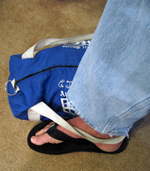 When traveling alone you will at some point find yourself in a crowded airport terminal or restaurant waiting with multiple pieces of luggage. Professional thieves choose this high-commotion areas to target unsuspecting individuals because there are a lot of distractions and they can quietly snatch a bag while you are preoccupied with something else. When I’m at the gate and I know I’ve got my boarding pass and I’m good to go, I turn on the iPod and snooze before the flight. And under normal circumstances if I were to leave my bags on the ground next to me, I would become a prime target for a thief to stroll by and lift them. As simple as it sounds, here is a technique that prevents this:
 Using plastic bags as carry-ons is just never a good idea if you can avoid it. Not only are they flimsy but they eventually turn your fingers into sausage links if they’re loaded with heavy stuff and you have to carry them far.
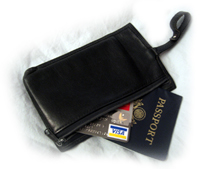 When traveling in Mexico especially, I will split both my cash and credit cards in two places so that if my wallet is stolen I still have dinero somewhere else. If you travel with a money belt I recommend putting a credit card and a few bills there and leaving the rest in your wallet. Cash is king in an emergency situation but the credit card ensures you have access to larger money if you need it.
 What I’m proposing here is nothing short of the worldwide Vehicular Thomas Crowne Affair.
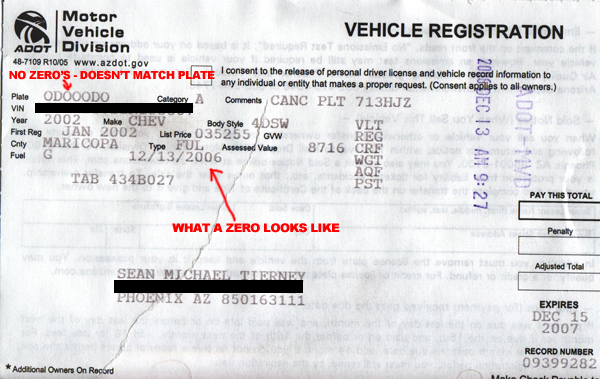
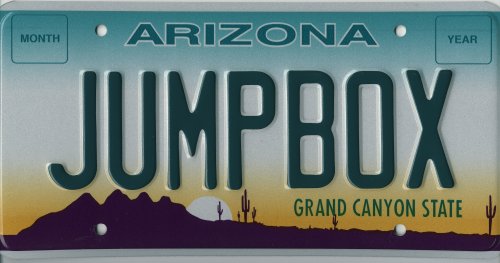
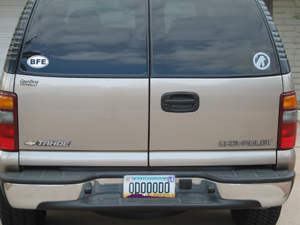 I just got my plate from AZ DMV and happily installed it this morning. It can still be read by the keen eye but from one of those crappy photo radar pictures it will be a non-trivial task to make out the characters. There aren’t many grey Tahoes in AZ that have a plate seemingly with all zero’s so with any amount of research effort the examiner could probably figure it out. But much like
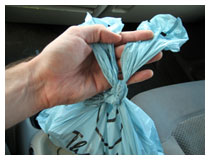 If you find yourself driving alone with fast food that has spill-able contents like soups or primarily-liquid dishes in boxes, here’s a neat trick you can use to avoid from spilling your food. Take the “rabbit ears” of the bag, roll down your passenger-side window slightly, poke the knotted portion of the bag out the window and close it so it pinches the bag and suspends your food. You now have your own “gyroscopic to-go food transport pendulum” (?!?) that keeps your food balanced upright as you take turns on the way home. I came up with this technique while grabbing to-go Japanese the other night.
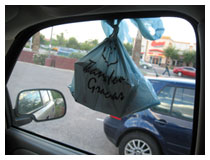 Of course you look like an idiot driving with rabbit ears hanging out your window but hey, priorities… I had a bag that had a big container of miso soup in it and found myself holding it upright by grabbing the top with my right hand while driving home. It occurred to me that the window could achieve the same function so I tested it and was pleased with how well it worked.
 So I think I’ve broken the code on the green tea at Starbucks. By the way I’m addicted to this drink. Every day at 3pm I jump in my car and make the pilgrimage to the closest dealer –ahem, I mean Starbucks– to get my venti unsweetened shaken green tea. This habit which costs me $2.11 each day has roughly the same financial impact as the nicotine addiction for the smoker that consumes a pack of cigarettes every day (granted it’s a little bit healthier).