


I wrote a little while ago about this concept of “if you’ve highlighted everything…” and why it’s good to keep your main list of current assaults lean. I wanted to explain the concept of urgency vs. importance that I mentioned in that post and then propose a simple addition to the 4 mechanisms for managing scattered todo’s that I use.
Urgency and importance are completely independent of one another. Once you understand that, doing triage on a todo list becomes way easier. The best way to understand this concept is through a simple graph of tasks:
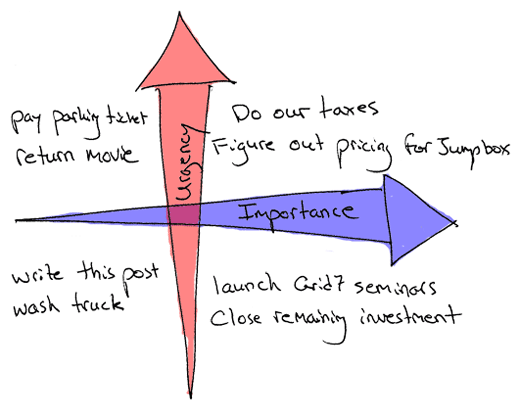
I’ve found once you are able to visualize your todo list in this 2-d fashion it helps in a couple respects:
- You’re able to tease apart those items which truly have the ability to advance your cause from the ones that are just stressing you out because they’re yelling for your immediate attention. It’s an important distinction and critical to being effective.
- If you keep your items stored visually in this fashion it lets you quickly handle items in the right quadrant depending on the situation. You should obviously try to work on the right-most items as much as possible while giving attention to the upper right quadrant first. During the day, forget that the left quadrants even exist. When you’re decompressing, go to the lower-left. When you’re catching up on errands, upper-left. The point is you always know what you should be doing.
- This leads to what David Allen calls the “mind like water” feeling of being at peace even in the face of massive amounts of todo items. Even when there’s a kajillion things going on, there’s something about having an accurate picture of the field and knowing that your items are stored in a trusted system and you’re knocking out the priorities first.
Where I disagree with the orthodox GTD cultish philosophy that Allen espouses is in the idea that you should try to cram everything into a single trusted system. I wrote about the 4 mechanisms I used to do what I call “Scattered Todo Management” and having tried orthodox GTD, I found this to be more suited to the way I work. Anytime you find yourself uncomfortable contorting your processes to match the latest and greatest productivity religion, I think that’s bad. Ultimately you should learn the fundamentals of various different productivity religions and pick and choose the elements that work for you and make your own.
So this is the 5th System for Scattered Todo Management that I’ve been using and want to share. It’s a simple way of easily deferring and categorizing tasks while still making immediate steps toward the solution and preventing build-up of crap in your inbox:
- Mentally superimpose the above graph on your desktop (or if you really want, draw it as your background).
- Drag the resources (URL locations, documents, graphics, audio files, forms, whatever you’re working with) to the appropriate quadrants on your desktop. URLs are the exact pages on a site with which you need to do whatever task it is. You can chunk a bunch of related items for a discreet task in a folder.
- Now rename the filenames to “verb-noun” (ie. “handle tax returns” URL item links to the online filing page on the IRS.gov site)
That’s the essence of it and simple as it seems, it’s a way to have a big picture view of the tasks on your plate and to defer the low-priority items while still “teeing them up” so you don’t have to weed through a daunting inbox of emails to figure out what each task involves. This is my desktop right now:
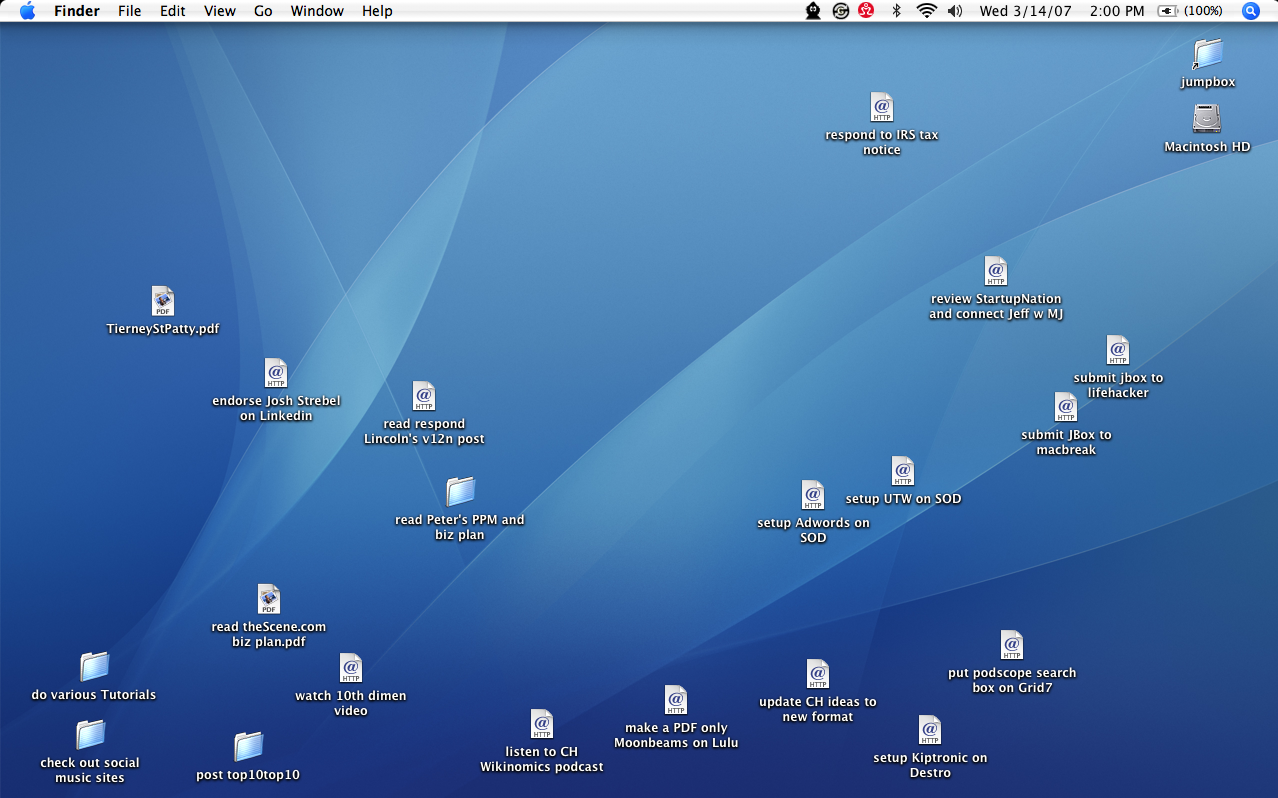
As you can see items are roughly thrown into the spots that correlate with the position on the urgency vs. priority graph above. I’ve found this technique helpful along with the other 4 systems to manage the things I’m doing every day. If you have a homegrown productivity technique that works well for you, I would love to hear about it.


[…] I’ve spent a great deal of time trying to find an organizational system that would fit my personality and balance my distaste for with my real-world need for organization in my life. Getting Things Done by David Allen was a great starting point for me, but even that was too complex for me. Sean Tierney gives his GTD mod process some love here and here. but I’m lost in a sea of disparate data sources there. So here are some tips for the slackers out there to get things done. […]
[…] Urgency vs. Importance and the 5th system for scattered todos: Mentally superimpose the above graph on your desktop (or if you really want, draw it as your background). […]
This is a principle I learned from playing Go, a game in which you are usually faced with a great number of possible moves. So, prioritize big (i.e. important) moves and urgent moves.
Julian
Great post, Sean — I’m also a very visual person, and this sounds like a great system.
I’ve customized my own way of working, too, having rejected “orthodox GTD”… and this is a great tweak to add into my plan.
I’m not a big fan of cluttering up my desktop, though… I take the Zen approach to my desktop. Instead, I have a page in a Curio document that has my current projects in it, which is easy to pull up. (Whatever works, eh?)
Anyhow, thanks again — great insight.
[…] There’s a fantastic post over at “Scrollin’ On Dubs†about Urgency and Importance, where Sean Tierney writes about how to track what’s Urgent and Important in your work. […]
[…] Urgency vs. Importance and the 5th system for scattered todos – [ScrollinonDubs] digg_url = ‘http://www.lifehack.org/articles/management/organizing-todos-urgency-vs-importance.html’; ( function() { var ds=typeof digg_skin==’string’?digg_skin:”; var h=80; var w=52; if(ds==’compact’) { h=18; w=120; } var u=typeof digg_url==’string’?digg_url:(typeof DIGG_URL==’string’?DIGG_URL:window.location.href); document.write(“”); } )() Author: Craig Childs Posted: Friday, August 24th, 2007 at 7:30 am Tags: todo Bookmark or Share this with a friend! […]
This is a great concept, but I would make one suggestion. Reverse the horizonatal arrow to point left. Although we tend to think of right as better than left, you end with your MOST important items in the top right section. Studies have proven, however, that English readers have been trained to begin, and so focus more intently on the top LEFT section of a media.
If you are using the visual version of the graph as an actual to-do list, as I am wont to do, having your most important items in the location your eye is naturally drawn to will increase your chance of getting to those items first.
[…] Scrolling on Dubs has a great way to help you prioritize your To-Do list. […]
[…] Urgency vs. Importance and the 5th system for scattered todos – ScrollinonDubs […]
[…] Doing less as a way of achieving more is quite simple, the really hard part is figuring out what you want to accomplish, and then identifying what is truly important to get there. Don’t confuse urgency with importance. In any task only 20% of the activities around it are truly important, the other 80% are trivialities that can be ignored. One of the most important skills you can have in life is figuring out which is which. […]
[…] Bene įdomiausias ir vienas iÅ¡ paprasÄiausų rastų bÅ«dų yra paskirstymas svarbos ir skubos koordinaÄių sistemoje. Tokiam planeliui pakanka popieriaus lape nusibrėžti dvi linijas – vertikaliÄ… skubos ir horizontaliÄ… svarbos – o darbus iÅ¡dÄ—lioti, pasveriant kiekvienÄ… pagal abu parametrus. Jei pavyksta viskÄ… padaryti sąžiningai, tai virÅ¡utiniame deÅ¡iniajame ketvirtyje atsiduria neatidÄ—liotini darbai, kurių reikia imtis pirmiausiai, bet bendra darbų tvarka Å¡iaip slenka iÅ¡ virÅ¡aus į apaÄiÄ…. […]
Original idea! Seems like a lot of work, though…
[…] Veja a proposta de scrollinondubs que envolve uma interessante disposição dos documentos no desktop em base a dois critérios: urgência e importância. […]
Original idea! Seems like a lot of work, though…
Greate idea!
But can you help me about how to judge what is Urgency and what is Important?
I think things help me with my target is more important, but can the urgency be judged based on time limit ? Or anything else?
Thanks very much
Great Idea! Checkout goalcloud.com . This site provides a great way to implement the urgency vs. importance prioritization, and many other features too.