


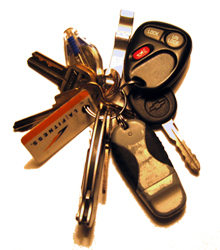
 If you’re like me you have a janitor’s key chain with twenty things on it. At least once a week I set off the panic alarm on my truck by accident because one of the gadgets on my key chain presses the button. In fact the only time I ever intentionally use the panic button is when I’m trying to locate my truck in a parking garage. But I’ve realized I can get the same honk and light flash by clicking the arm button twice and since I rarely panic anymore I now have zero use for this button. Here is the trick I came up with this evening to eliminate the annoyance of accidentally triggering the alarm:
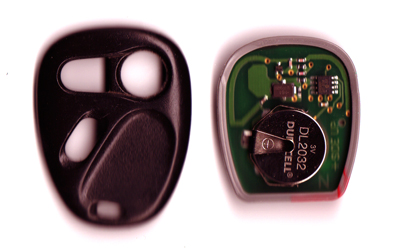
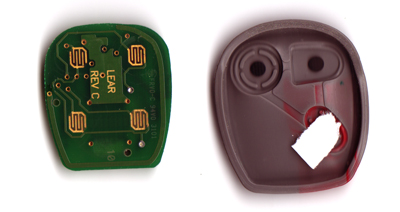
On these cheap remotes the button is not pressure-sensitive, it’s activated when the metal on the rubber piece closes the circuit. By putting something in between the contacts you prevent the circuit from closing and you can take the paper out if you ever decide that you need the panic button to work again. A non-destructive, 30sec fix to a weekly annoyance. It’s the simple things right?





It’s always the simplest of things we never think about…
"since I rarely panic anymore"
Thats great.
the only time I panic is when I set the panic alarm off.. a small bit of electric tape would stay put better. Thanks for helping me.
Thank you.
I have been bugged by this for 8 years. It always goes off at the most inappropriate time. Thank you for the fix !
[…] It’s a very simple tip that involves cracking open the key fob and placing a piece of tape between the panic contacts. If your spend more time embarrassed because you inadvertently “panicked” than you’d prefer, this simple, non-destructive fix should take care of that. — Adam Pash How to disable your car alarm panic button non-destructively [Scrollin’ On Dubs] […]
I have been meaning to tear into my GM remotes since I got this darned truck. Thanks for posting this info!
You are a godsend! Thank you!!! I have cussed that damn button so many times, wondering why the hell the manufacturers still think anyone wants it. At least they could put a cover over it to prevent accidental execution…
Linking to you right away!
Doesn’t work with my Ford remote. The buttons are not of the type described in which a metal plate on the back of the button connects the metal contacts. In my Ford remote, the plastic buttons press a metal button built into the electronic circuit board. I’d love to disable the panic button, but there is no way that I have the savvy to mess with the circuit board. Good idea though and I wish it would have worked for me.
I did something similar for my G4 iBook. I wanted to use the Caps Lock key as the Control Key to make it easier to use Emacs. The only problem is, the light still went on and off, which is distracting. I tried to find a BIOS hack, but to no avail. After that I tried putting a little piece of mailing label on it, but it changed the way the key felt when pressing down on it. That would be more annoying than the light. So I flipped off my caps lock key and pushed down on the LED with a flathead screwdriver and jiggled it a bit. It disabled it permanently.
I thought a bit about any possible problems it might cause before doing it, and concluded that it was unlikely that anything would go wrong. Sure enough, it worked!
Thanks, Sean! I’m linking to this nifty tidbit. Especially handy when you’ve got kids that like to handle car remotes.
tanks, nice work on a get around for your car alarm
[…] How to disable your car alarm panic button non-destructively If you’re like me you have a janitor’s key chain with twenty things on it. At least once a week I set off the panic alarm on my truck by accident because one of the gadgets on my key chain presses the button. In fact the only time I ever intentionally use the panic button is when I’m trying to locate my truck in a parking garage. But I’ve realized I can get the same honk and light flash by clicking the arm button twice and since I rarely panic anymore I now have zero use for this button. Here is the trick I came up with this evening to eliminate the annoyance of accidentally triggering the alarm: […]
Works great I was setting off my alarm all the time on my Jeep Cherokee, although it had an extra contact layer of plastic between the button (rubber) and the circuit board, so I had to put the paper between the contact layer and the circuit board.
[…] It’s a very simple tip that involves cracking open the key fob and placing a piece of tape between the panic contacts. If your spend more time embarrassed because you inadvertently “panicked” than you’d prefer, this simple, non-destructive fix should take care of that. — Adam Pash How to disable your car alarm panic button non-destructively [Scrollin’ On Dubs] […]
My Camry's fob has the kind of tiny metal button Allan mentioned. I used a kitchen knife to slice a 1/8" piece off the tail end of a Bic pen casing (a cheap white one) and laid it around the button like a collar. Now the outer button presses the collar before it hits the contact.
Thank you! I couldn't think of what to use. I fond a plastic washer but it was too thick. But I guess I can go buy the right kind of plastic washer as easily as buying a Bic pen. But thank you anyway.
i guess mine is the “expensive” kind, cuz the metal contacts are integrated on the circuit board. it was worth a shot, though. Thanks.
I had another type of controller where it had a literal button. The rubber piece would push the button in a fashion that adding a piece of paper just over it would “amplify” it’s sensitivity. My solution was to cut 5 layers of business cards in a donut like shape to surround the button, then to have a piece of tape to act like a drum head over the top. This effectively enclosed the button and would not cause the circuit to close. In addition, the button would not push in, giving it a nice “rejected/disabled” feel.
This did not harm the circuitry.
Took me 30 minutes to do.
I’ve got the Ford one with the switch on the circuit board. I just covered the button on the outside with a piece of business card and wrapped electrician’s tape around it. The black tape matches the black case, so it looks OK. Problem solved.
I fixed mine today as well. It was 5:30 a.m. this morning going out to my car, I had a few things in my hand while I eas locking the house and the darn thing when off and woke the neighborhood. It was dark and I was panicing to turn it off and could not hit the right button right away. Needless to say I was very unhappy at that moment. I ended up throwing my key as hard as I could against the car which broke the remote. The problem is now fixed.
Quite the neat trick there. Thank you for sharing. I hit the panic button, oh way too often.
Thank you.
I have the Ford style, with the metal button/switch fastened directly to the circuit board. I was disgusted enough at the thing that I just popped it right off. It came off easy. The circuit it was attached to remained intact. Now it locks/unlocks as intended, and the “hey everybody I just got home in the middle of the night” button is permanently disabled, which suits me fine. Thanks for the idea, I probably wouldn’t have dug into it without your tip.
Wow. Great idea. Unfortunaltely Ford had a “better idea.” The board is integrated with the key and is inside *molded* plastic. I hit it almost daily (usually on the way in to work about 100 ft from the vehicle).
Class action suit should be launched at all manufacturers putting panic buttons with no way to disable it. Constantly wake up at dummies pushing the button (accidently or not). My time spent on this is at several hundred bucks I want back. I’m gonna sue.
Thank you, I will try it!! If this doesn't work I will just have to find out which neighborhood Alan Mulally lives in, park my car there, hit the button and leave.
Can anyone tell me why my remote would lose it's range. At best it was only good for about 40 feet. Now I have to be 15 feet or less from the front of the car. It usually won't work at all if I am behind my car. I have replaced the battery, it is brand new, still no difference.
I looked inside of mine for my Subaru and it has a rubber surface that pushes a micro switch. I took and cut out a section of thin clear plastic just a bit larger than the panic switch opening and taped it over the outside area. Talking about plastic of the type you'd see on a cover you'd find for a printed report or you could cut out a section of that clear plastic used to seal up small items that is so hard to open up the package when you get home from the store, the anti-theft packaging material.
Dave, to get additional range from your remote, simply hold it up to the bottom of your jaw bone. Don't know why, but it will add more reach and your remote will work. (Seriously)
Tm, I've noticed that works as well. It seemingly makes your body an antenna or something but definitely extends range on your car remote.
You just changed my life. I've been setting off the stupid effffin panic button on my Nissan Altima since 2009.
THANK YOU!!!
For the 2015-2017 F-150's, there is apparently a programming trick that changes the panic button to require 2 presses in a limited time to activate the alarm. That would probably take care of 95% of my problem. I don't know what is required but https://www.unleashtheford.com/modifications in the Houston area claims to offer this service.
I had lost a set of keys. Someone has the set. They keep setting off the alarm. Kind of ignorant, but they have been doing this for about two months. I have a 2006 mercury mariner, and was wondering if there is a way to shut this off on the vehicle itself.
For the pressure sensitive FOBs, the drawing above is helpful. Only difference is a rubber pad with raised buttons for each button on the FOB. Remove the rubber pad. Cut the raised button over the panic button. All the other buttons work. Panic button permanently silenced!